Introduction
Webhooks are a way to communicate to your backend real-time by sending data to a predefined URL when a specific event occurs. This will allow your applications to work together with Sevi seamlessly without manual intervention. The webhook will send a POST request to your predefined URL. You can use this information to process payment and other details in your system.
Sevi sends webhooks for these events:
| Event | When | Use it for |
|---|---|---|
ORDER | Every change of an order: created, paid, delivered, cancelled, refunded, items changed | Order status in your system — "buyer paid, ship now" and "delivered" |
TRANSACTION | Every completed money movement on your wallet | Bookkeeping — "seller credited" and daily settlements |
CUSTOMER | A buyer was added or completed their profile | Optional |
For a payment integration configure at least ORDER and TRANSACTION. See the Integration flow for which webhook arrives when.
Delivery guarantees
- Your endpoint must answer
200or201. Any other response (or a timeout) is retried up to 3 times with exponential backoff. - Webhooks can arrive more than once and out of order. Make your handler idempotent (order
id/ transactionid) and always act on the state in the payload, not on the order in which calls arrive. - Respond fast and do heavy processing asynchronously.
- If your endpoint was down, reconcile with
orderSearch.
Set up
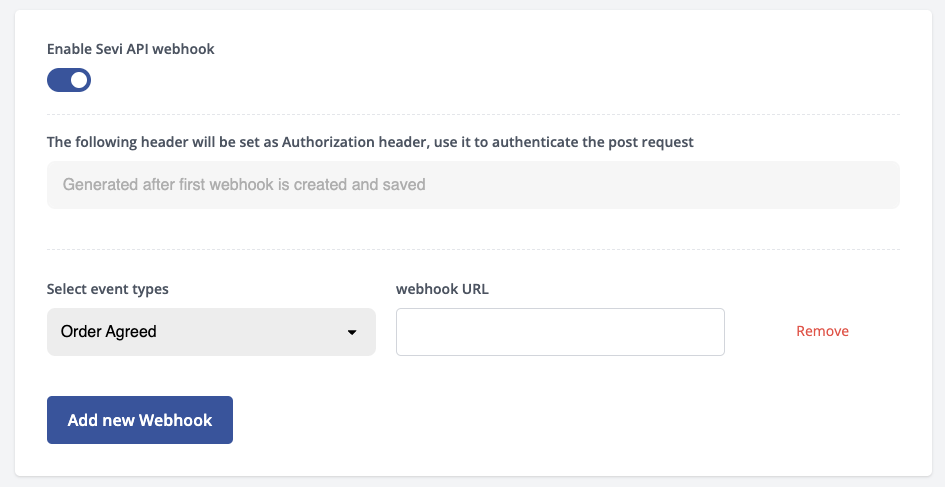
In the seller dashboard (admin.sevi.io, or the staging dashboard for the sandbox) go to Settings, enable webhooks, select an event and enter the URL that should receive it. You can also register a URL via the setUpWebhooks mutation.
Test your interface with a postman collection
Authorization
Every webhook request Sevi sends includes an Authorization header containing a secret token. You should validate this token on every incoming request and reject any request whose token does not match (respond with 401 Unauthorized).
POST /your-webhook-endpoint HTTP/1.1
Host: your-domain.com
Content-Type: application/json
Authorization: 1b2c3d4e-5f6a-7b8c-9d0e-1f2a3b4c5d6e
Key details:
- Token format — The token is an opaque string (a UUID) generated by Sevi when you set up your webhooks. It is sent verbatim in the
Authorizationheader (there is noBearerprefix and the request body is not HMAC-signed). - One token per account — A single token is shared across all events (Orders, Transactions, Customers) configured for the same wallet/account. Validating it identifies that the request genuinely originates from Sevi.
- Where to find it — The token is shown in the admin portal under Settings → Integrations / Webhooks when you create or view your webhook configuration.
- Rotation — You can regenerate the token from the admin portal. Rotating it replaces the token across all of your configured webhook events at once, so update your endpoint's stored secret at the same time to avoid rejecting valid requests.
- Transport — Always serve your webhook endpoint over HTTPS so the token is not exposed in transit. Combine token validation with the published source IP whitelist for defence in depth.
Treat the webhook token as a secret. Do not log it, commit it to source control, or expose it client-side. If you suspect it has leaked, rotate it from the admin portal immediately.